audiolaz

← All the questions

Release notes

Alexandreaudiolaz

What changed in each version of audiolaz Room, the newest first. The app updates itself: when a new version is out, its first screen says so, and “Update now” installs it. A question about a version? Ask it in a topic of its own.

44 versions

1.3.9 · 4 November 2026

  • Roon on a ROCK, a Nucleus (Roon OS 3.0 included) or the computer running audiolaz: after measuring, one tap on “Install in Roon” puts the correction in, nothing to copy.
  • There too, a past measurement tapped in “Measurements” shows with its curve, changing nothing in Roon; “Install in Roon” is right under it.
  • On a Linux computer, “Install in Roon” asks for its password first, once only.
  • If the link with the ROCK or Nucleus breaks during the install, the app says so on screen and starts Roon again by itself as soon as it answers.
  • A Roon file still open during the install: the app tries again by itself, and if it stays open, says so plainly and changes nothing.

No need to measure again: your correction stays as it is.

1.3.8.2 · 31 October 2026

  • An output still playing very low stays on the home screen, even paused, first and open, with its volume bar and Fixed volume.
  • Roon to a UPnP output: playback no longer freezes when the device stops to fill its memory.

No need to measure again: your correction stays as it is.

1.3.8.1 · 31 October 2026

  • Roon to a UPnP output: playback no longer freezes when the device stops to fill its memory.

No need to measure again: your correction stays as it is.

1.3.8 · 31 October 2026

  • The volume bar is always there, even while audiolaz plays very low for safety: raise it, nothing to answer first.
  • A Fixed volume option under the bar gives the level back to your amplifier or DAC.
  • An output that plays very low now always shows up in the app, even if you measured through another path.

No need to measure again: your correction stays as it is.

1.3.7 · 30 October 2026

  • The app finds your audiolaz player again when its network address changes.
  • Smoother AirPlay from an Apple TV, at the sound's own rate, and the app now knows which Apple TV is playing.
  • When a network (UPnP) player stays silent, the app says why and shows one button for what to do next.
  • Measuring the sync with an Apple TV finds the right player by itself.
  • Tidier screens: sound names fit on phones, "This PC" on Windows, and no more false peak at the top of the "After" curve.

No need to measure again: your correction stays as it is.

1.3.6 · 28 October 2026

  • A more natural sound: voices keep their body in the low mids, and the treble's timing is cleaner. Measured with a measurement mic, your system gets it by itself: the app sends your audiolaz player its new filters. If you use Roon's own convolution, tap "Install in Roon" again in the app.
  • The Link talks to USB DACs directly.
  • Clean stops, with no click, and no more crackle when DSD starts.
  • "Listening position" is simpler, and the app reopens the system you were on.
  • On Windows, the app opens properly, has its icon by the clock and finds Roon more reliably.

No need to measure again.

1.3.5 · 25 October 2026

Cleaner sound

  • No more micro-dropouts with the audiolaz network player.
  • No more crackling with AirPlay.
  • No more clipping: if the sound clips, the limiter turns itself back on.

Easier to use

  • The player now shows on each system's screen: the cover, the track playing, the volume and a VU meter. Three styles: tap the meter to switch.
  • With Roon, you control playback from the app: play/pause, previous or next track, and the progress bar to move within the track.
  • Each system's screen (formerly "room") shows the output in use. You can change it without measuring again.
  • Each system appears in AirPlay and Spotify under its own name.

More accurate

  • "Centre on me" measures the balance instead of estimating it.
  • Measurements are never altered on the way any more.

On Mac, the app is now notarized by Apple and opens without a warning.
No need to measure again.
1.3.4 · 22 October 2026

  • Free player: your DAC's sound, untouched, verified bit-perfect, and now a 64-bit volume for amplifiers without one, bit-perfect at 0 dB.
  • Play, pause, next and previous track from the app, with the free player too.
  • After a free measurement: what your room does to the sound, and what the correction would give back.
  • No need to measure again: your filters stay as they are.

1.3.3 · 22 October 2026

  • Play, pause, next and previous track from the app, for Roon, UPnP, AirPlay and Spotify Connect.
  • No preamplifier? audiolaz can now set the volume itself, from Spotify, Roon, your UPnP app or the app: it starts very low (−70 dB) and never goes above the maximum you set. In your room's settings: « How do you set the volume of this system? ».
  • AirPlay 2 and Spotify Connect on Linux correctors with nothing else to install, and audiolaz Link without dropouts, also for Mac.
  • « Centre on me » is done from your phone, in three clear steps.
  • On Windows, an update installs over the running app, and no window flashes up any more; simpler words everywhere.
  • No need to measure again: your filters stay as they are.

1.3.2 · 21 October 2026

  • On a Windows PC, the app now runs its own corrector, as on a Mac: your PC's USB DAC appears on the home screen, you measure through it, and Roon, UPnP/DLNA and Spotify Connect play to it corrected. The first time, Windows asks whether audiolaz-roomd and librespot may use the network: choose Allow.
  • On a Linux corrector the app installed (mini PC, Raspberry Pi), the room correction loads again: its licence had not reached it since 18 October.
  • Clearer wording on the home screen when there is no chain yet or when you measure with a USB microphone.
  • No need to measure again: your filters stay as they are.

1.3.1 · 20 October 2026

  • Night listening: listen quietly without losing the bass, the treble or the soft passages, and without loud moments that would wake the house. One switch on the room's page.
  • Recentre on me in every room, also when several rooms play at once, and through a UPnP streamer that plays the sound seconds later.
  • Swap left and right, and invert the polarity of each speaker, from the app or the player's page, the free player included: lossless, nothing recalculated.
  • On Mac: a notification when a new version or a new message here arrives, even with the app closed (Preferences › Help and contact › Version to turn it off).
  • No need to measure again: your filters stay as they are.

1.3 · 19 October 2026

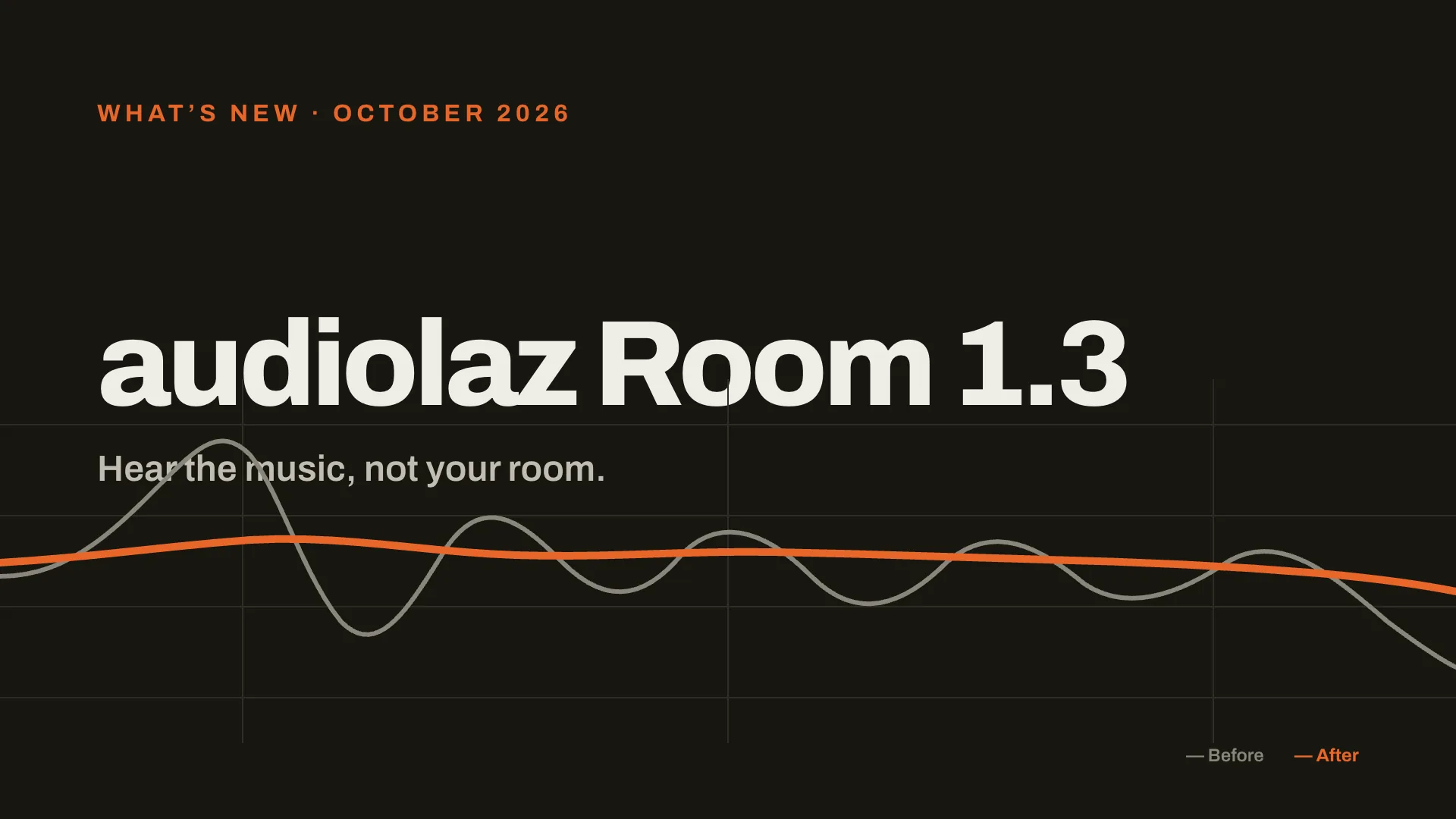
  1. audiolaz Room 1.3, what’s new, October 2026: hear the music, not your room. A room’s frequency response before correction, full of peaks and dips, and after, almost flat.
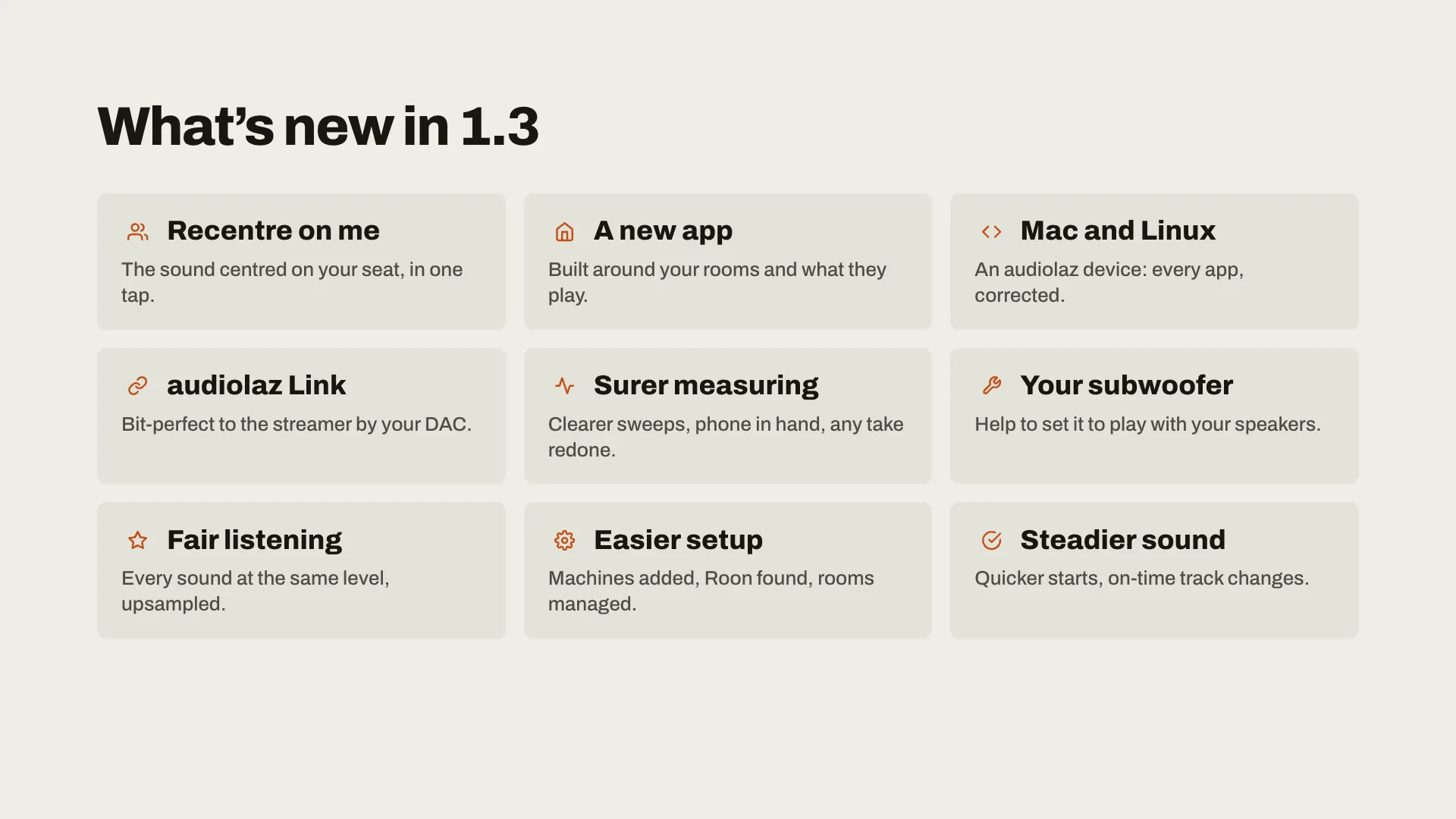
  2. What’s new in 1.3: Recentre on me, the sound centred on your seat in one tap; a new app built around your rooms; audiolaz on Mac and Linux, every app corrected; audiolaz Link, bit-perfect to the streamer by your DAC; surer measuring; help to set your subwoofer; fair listening, every sound at the same level; easier setup; steadier sound.
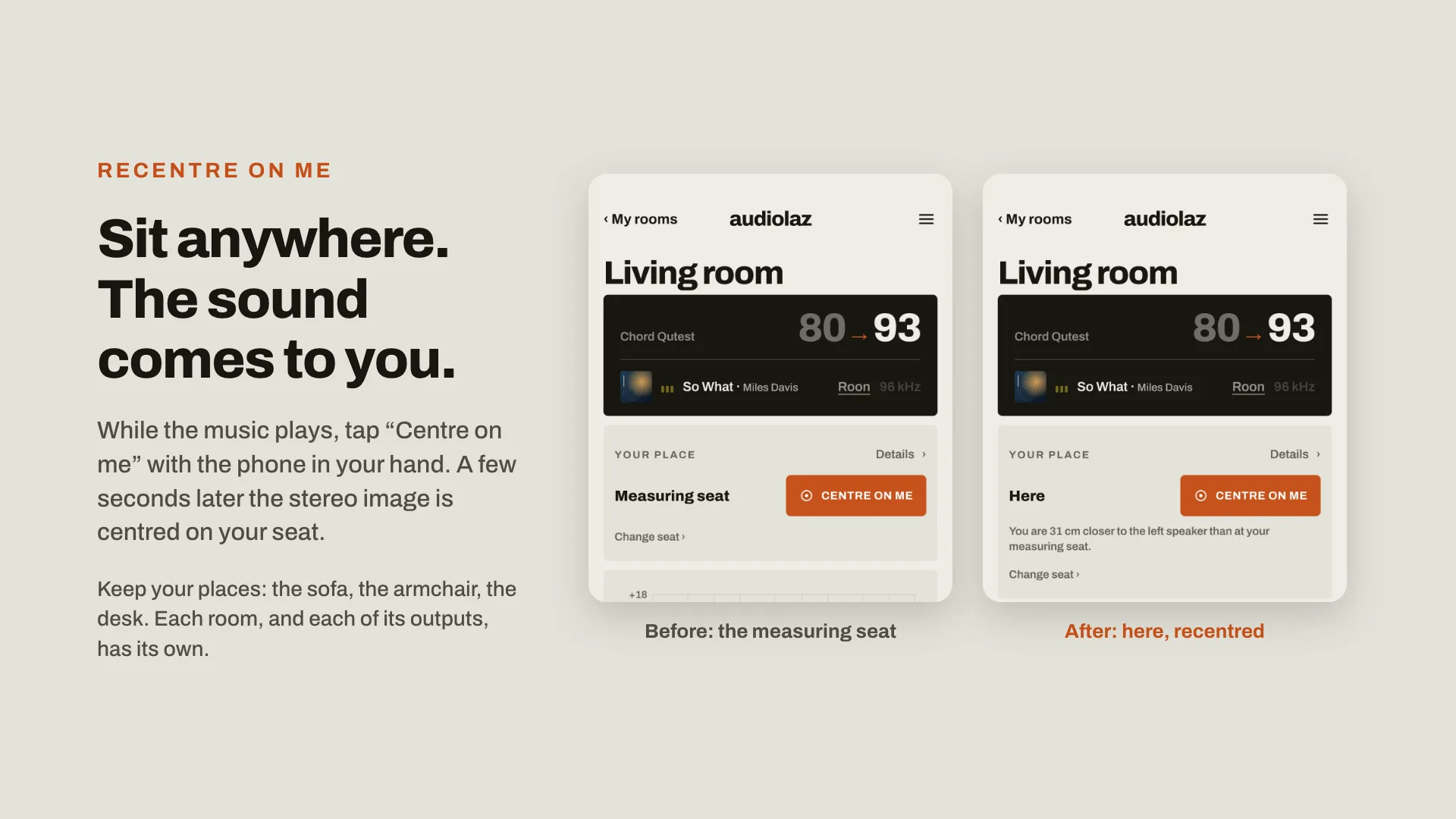
  3. Recentre on me. Sit anywhere, the sound comes to you: while the music plays, tap Centre on me with the phone in your hand, and a few seconds later the stereo image is centred on your seat. Your places are kept, for each room and each output. Two screens of a room’s page: before, the measuring seat; after, here, recentred.
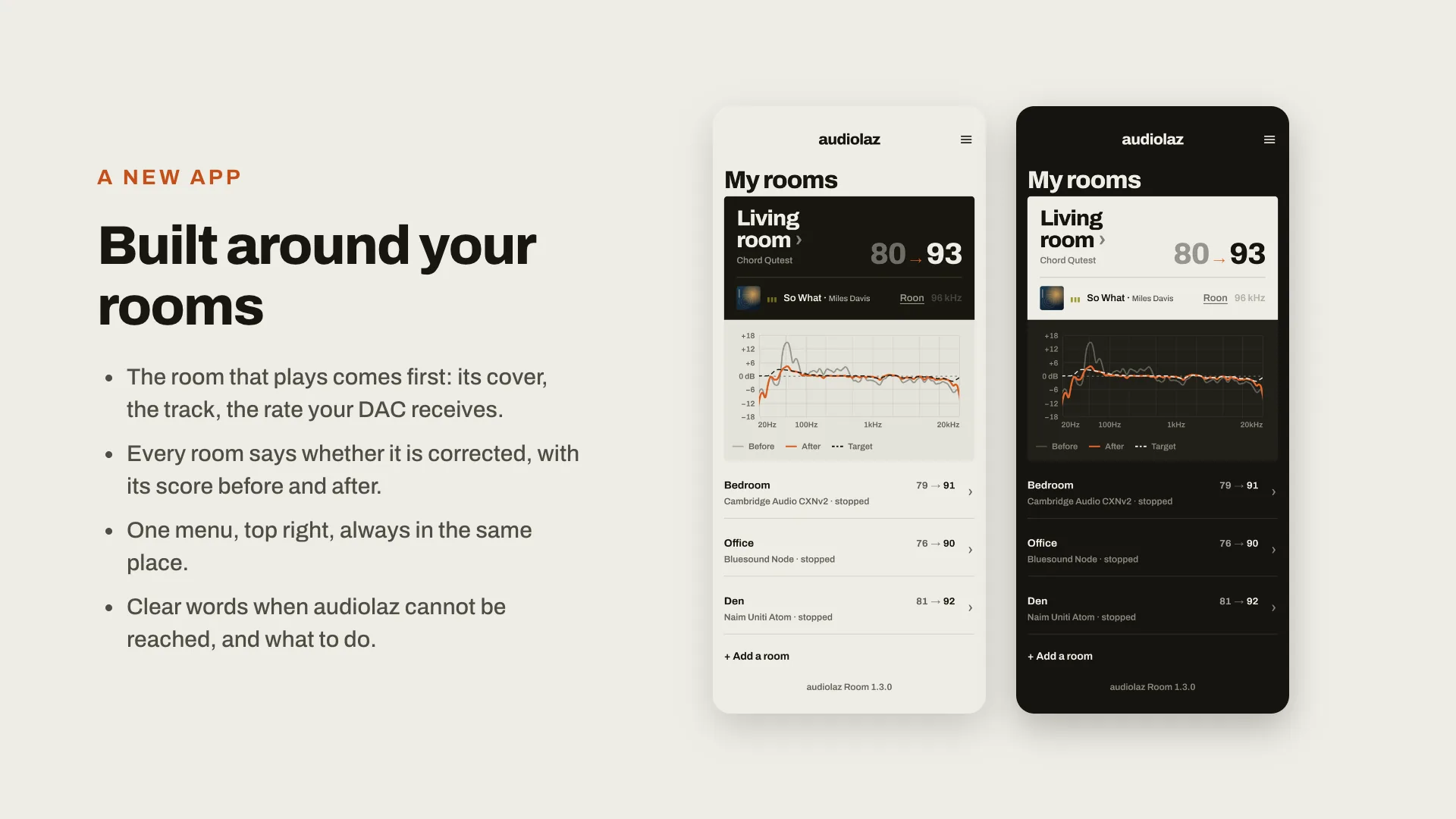
  4. A new app, built around your rooms: the room that plays comes first, with its cover, the track and the rate your DAC receives; every room says whether it is corrected, with its score before and after; one menu, top right; clear words when audiolaz cannot be reached. The My rooms screen, light and dark.
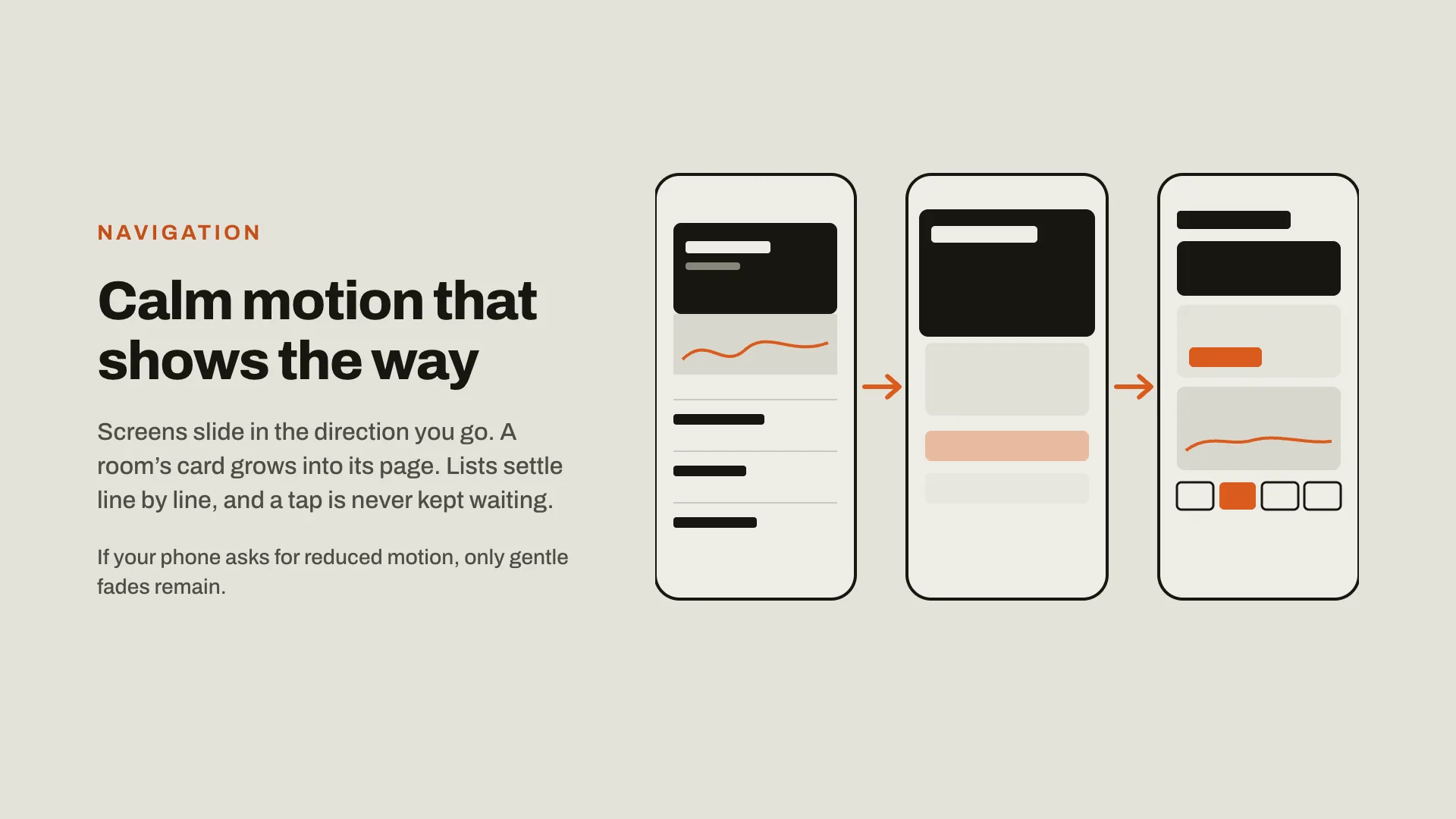
  5. Calm motion that shows the way: screens slide in the direction you go, a room’s card grows into its page, lists settle line by line, and a tap is never kept waiting. If your phone asks for reduced motion, only gentle fades remain.
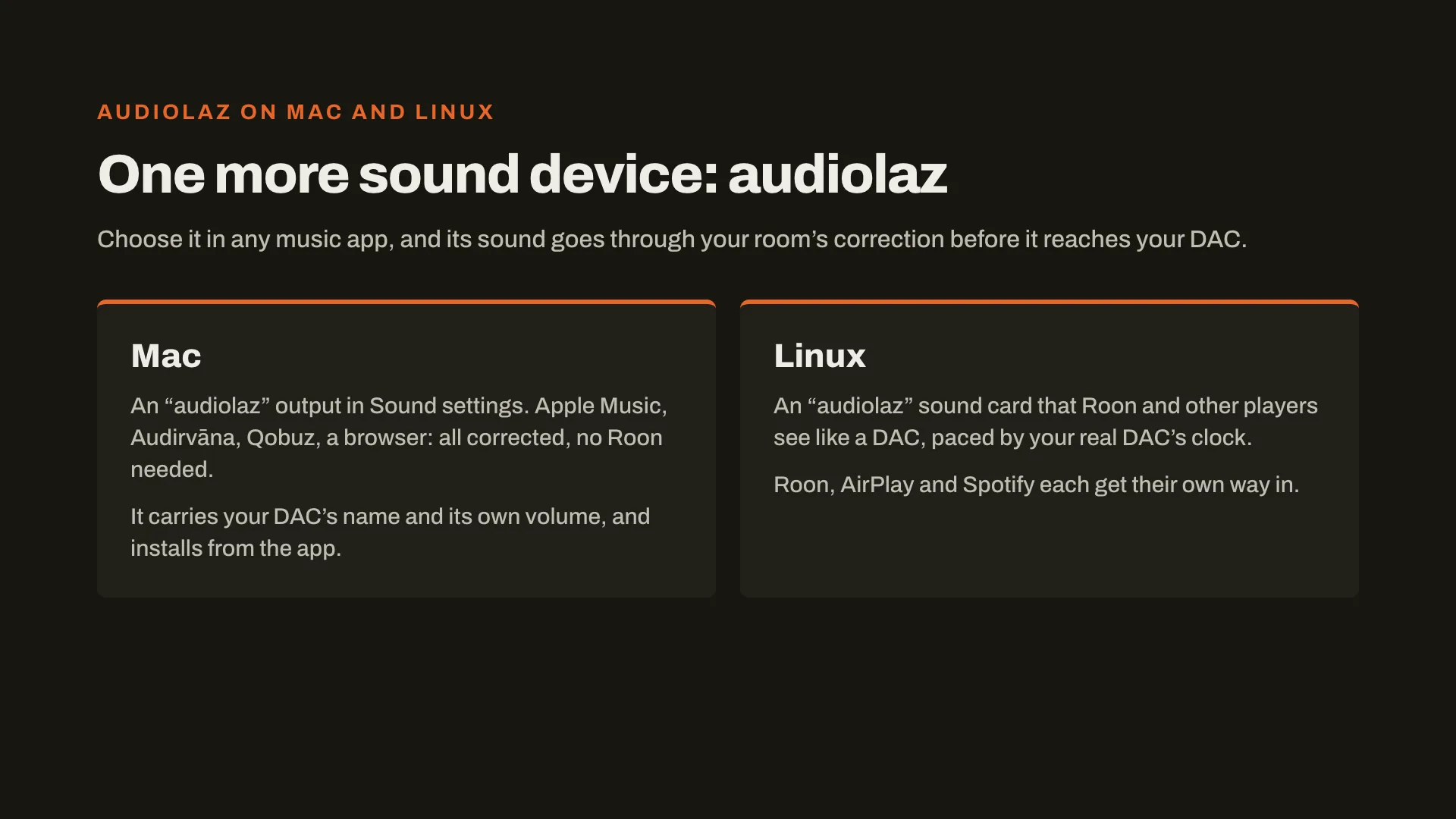
  6. audiolaz on Mac and Linux, one more sound device: choose it in any music app, and its sound goes through your room’s correction before it reaches your DAC. Mac: an audiolaz output in Sound settings, for Apple Music, Qobuz or a browser, no Roon needed. Linux: an audiolaz sound card that Roon and other players see like a DAC, paced by your DAC’s clock.
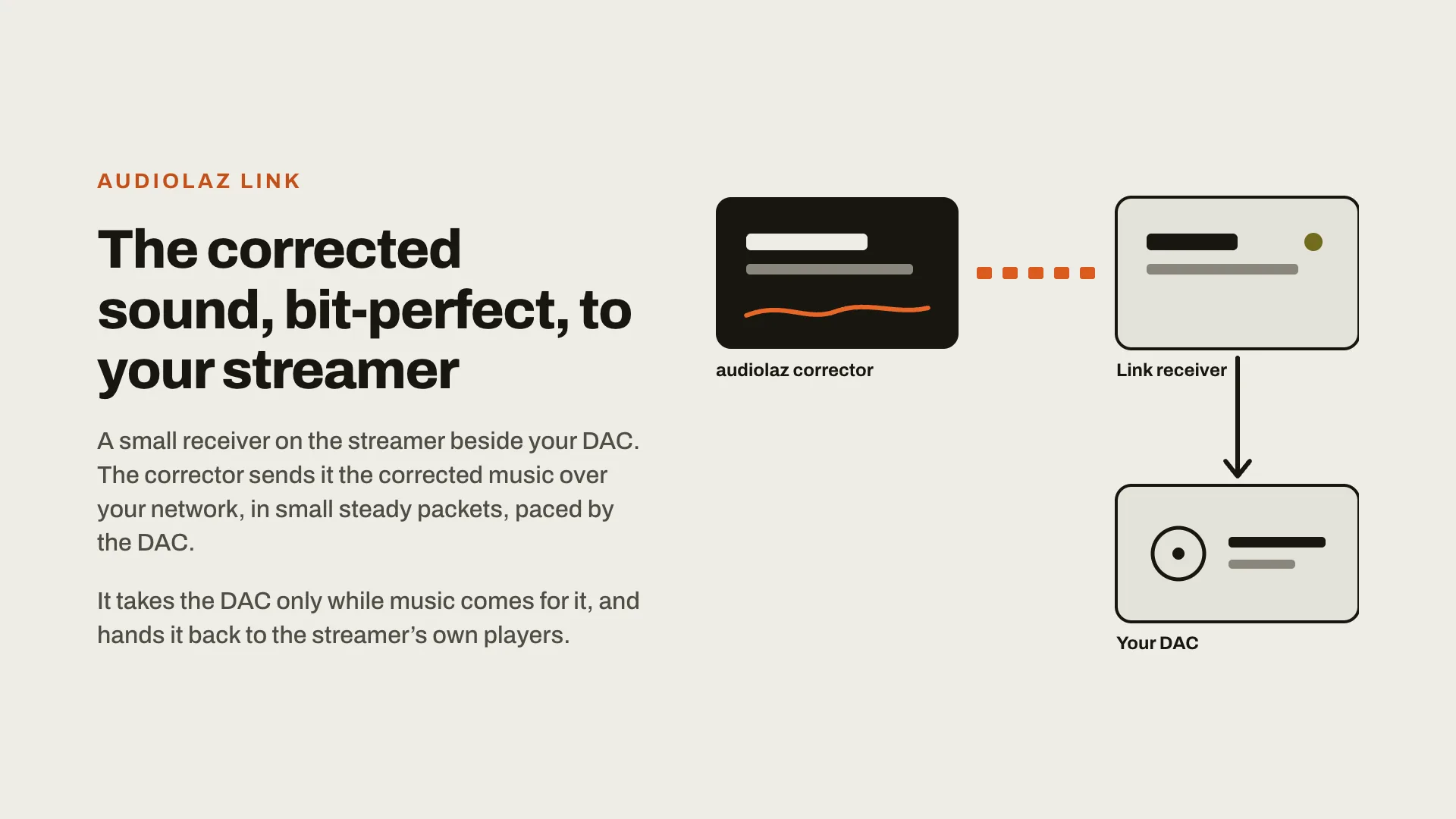
  7. audiolaz Link: the corrected sound, bit-perfect, to your streamer. The audiolaz corrector sends the corrected music over your network to a small receiver on the streamer beside your DAC, paced by the DAC. It takes the DAC only while music comes for it, and hands it back to the streamer’s own players.
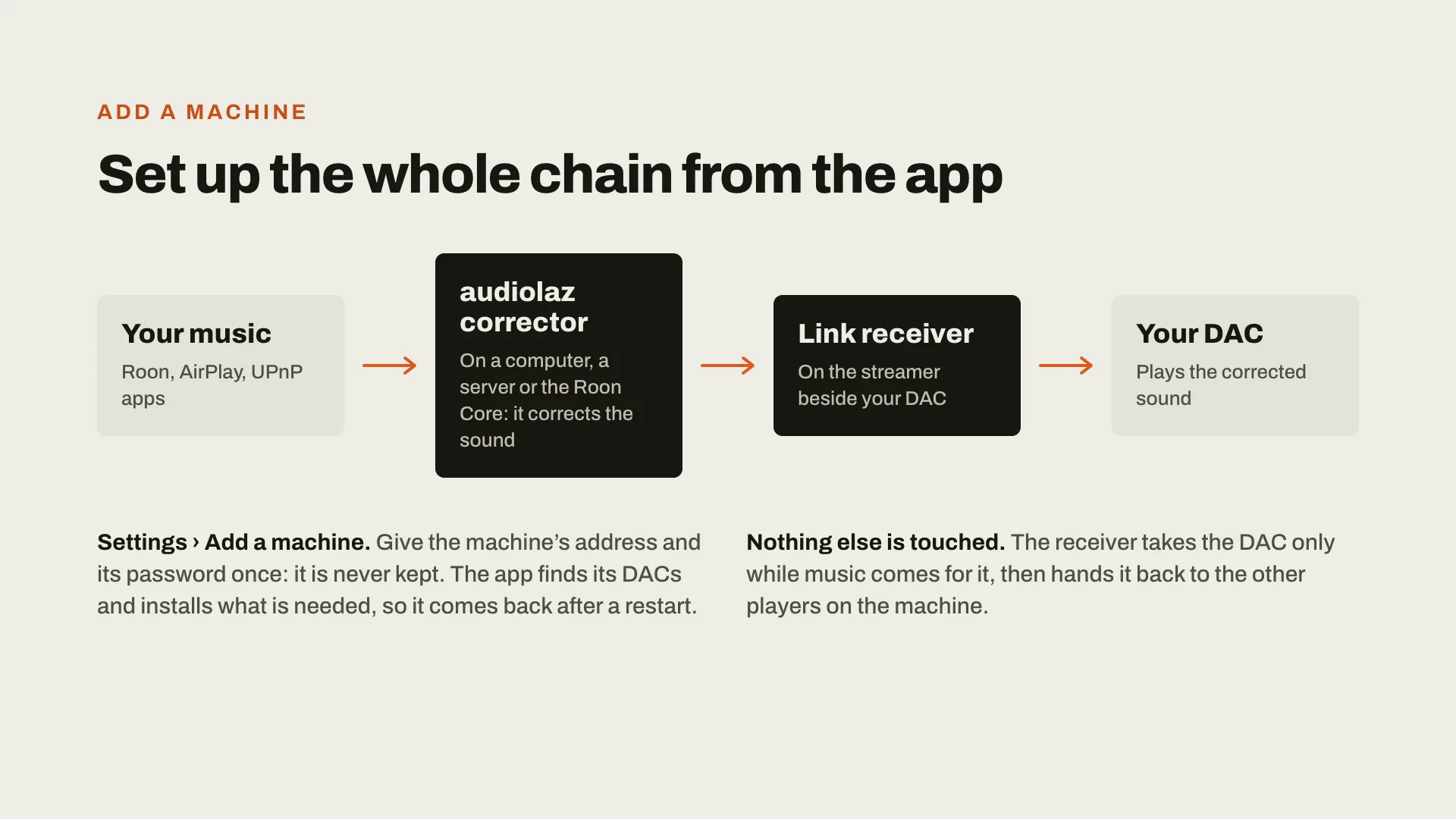
  8. Add a machine: set up the whole chain from the app. Your music (Roon, AirPlay, UPnP apps) goes to the audiolaz corrector, which corrects the sound, then to a Link receiver on the streamer beside your DAC, then to your DAC. Settings, Add a machine: the machine’s address and password once, never kept; nothing else on it is touched.
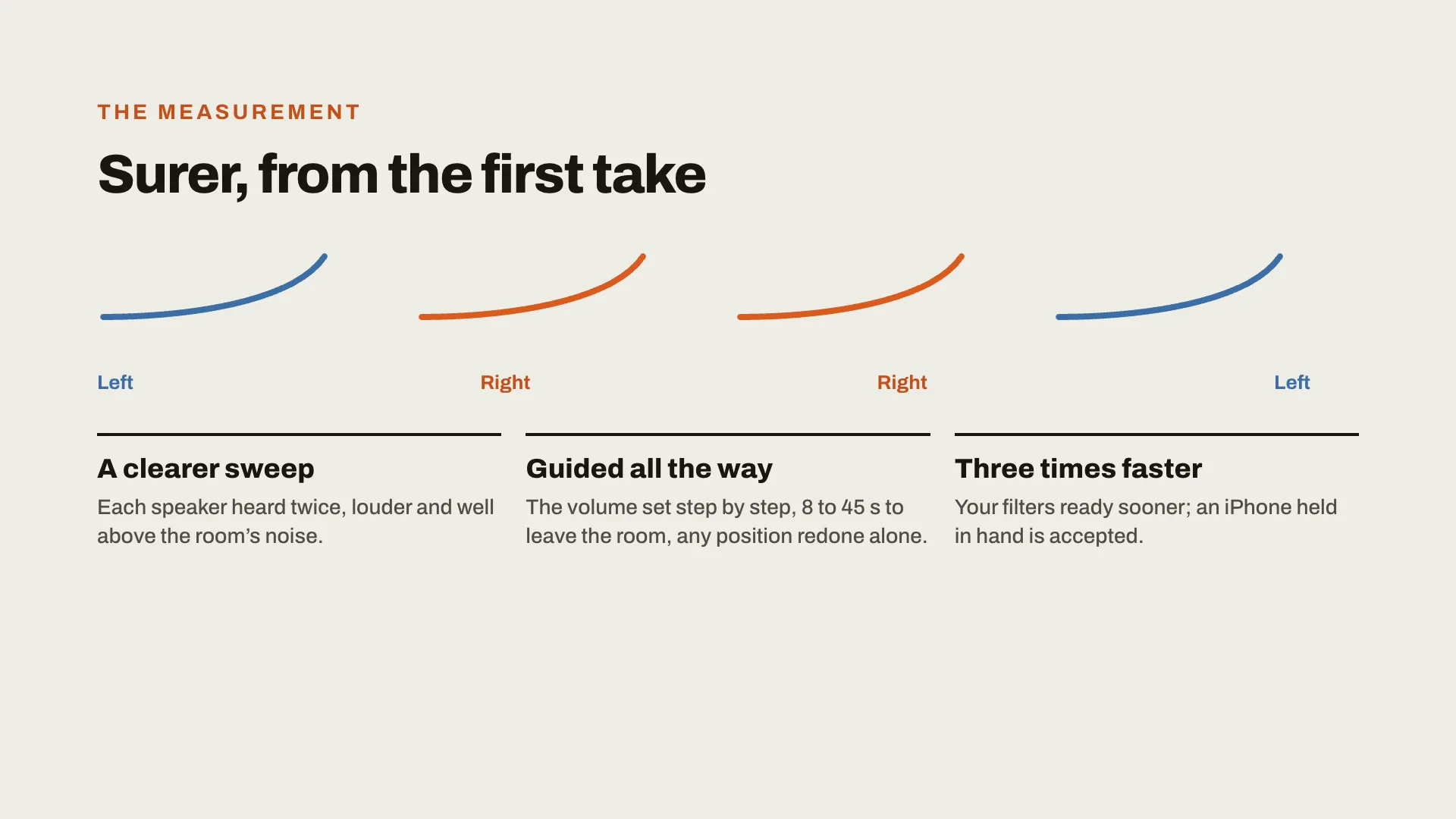
  9. The measurement, surer from the first take: a clearer sweep, left, right, right, left, each speaker heard twice, well above the room’s noise; guided all the way, the volume set step by step, any position redone alone; three times faster, and an iPhone held in hand is accepted.
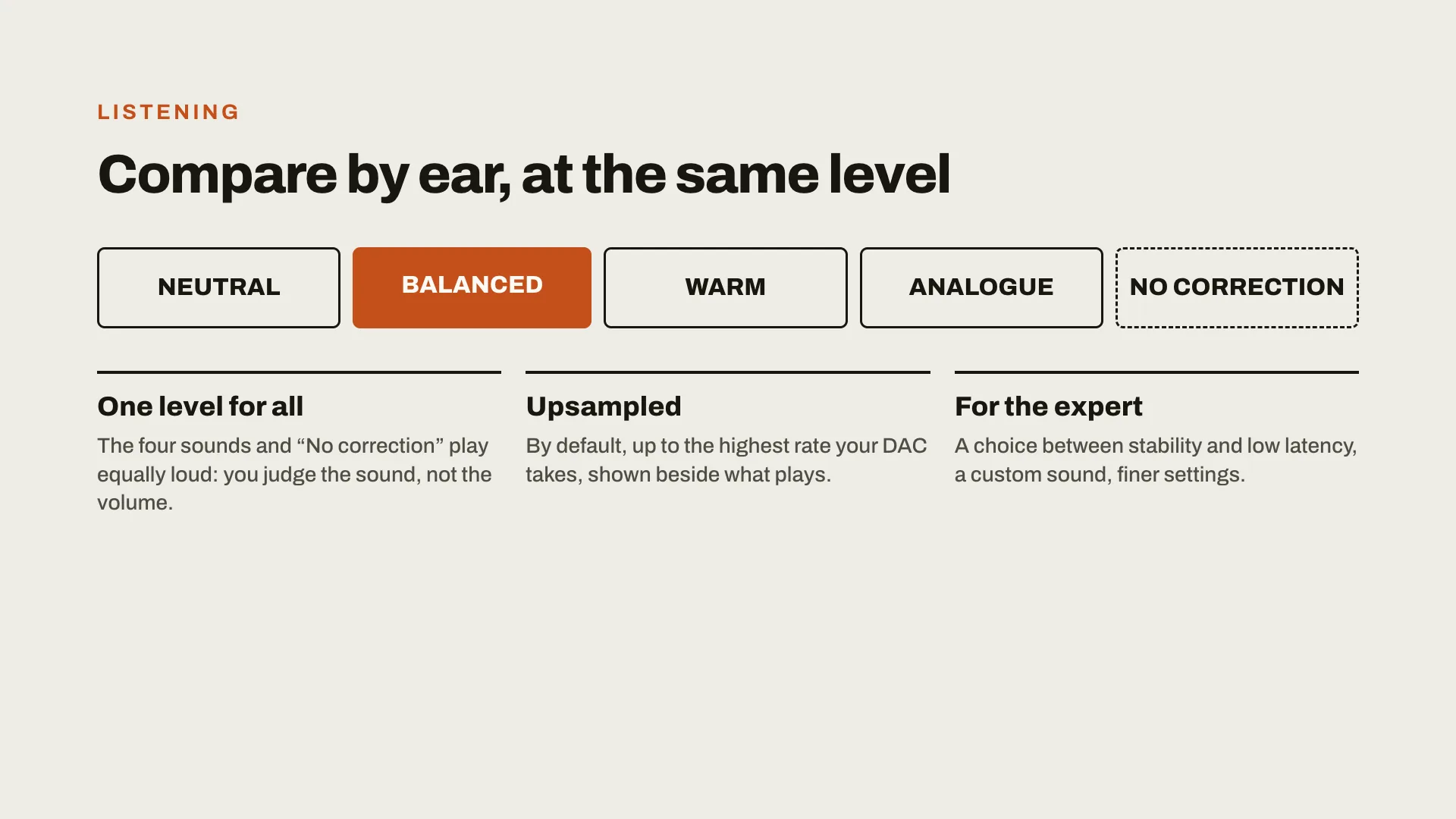
  10. Listening: compare by ear, at the same level. Neutral, Balanced, Warm, Analogue and No correction all play equally loud, so you judge the sound, not the volume. Upsampled by default to the highest rate your DAC takes. For the expert: stability or low latency, a custom sound, finer settings.
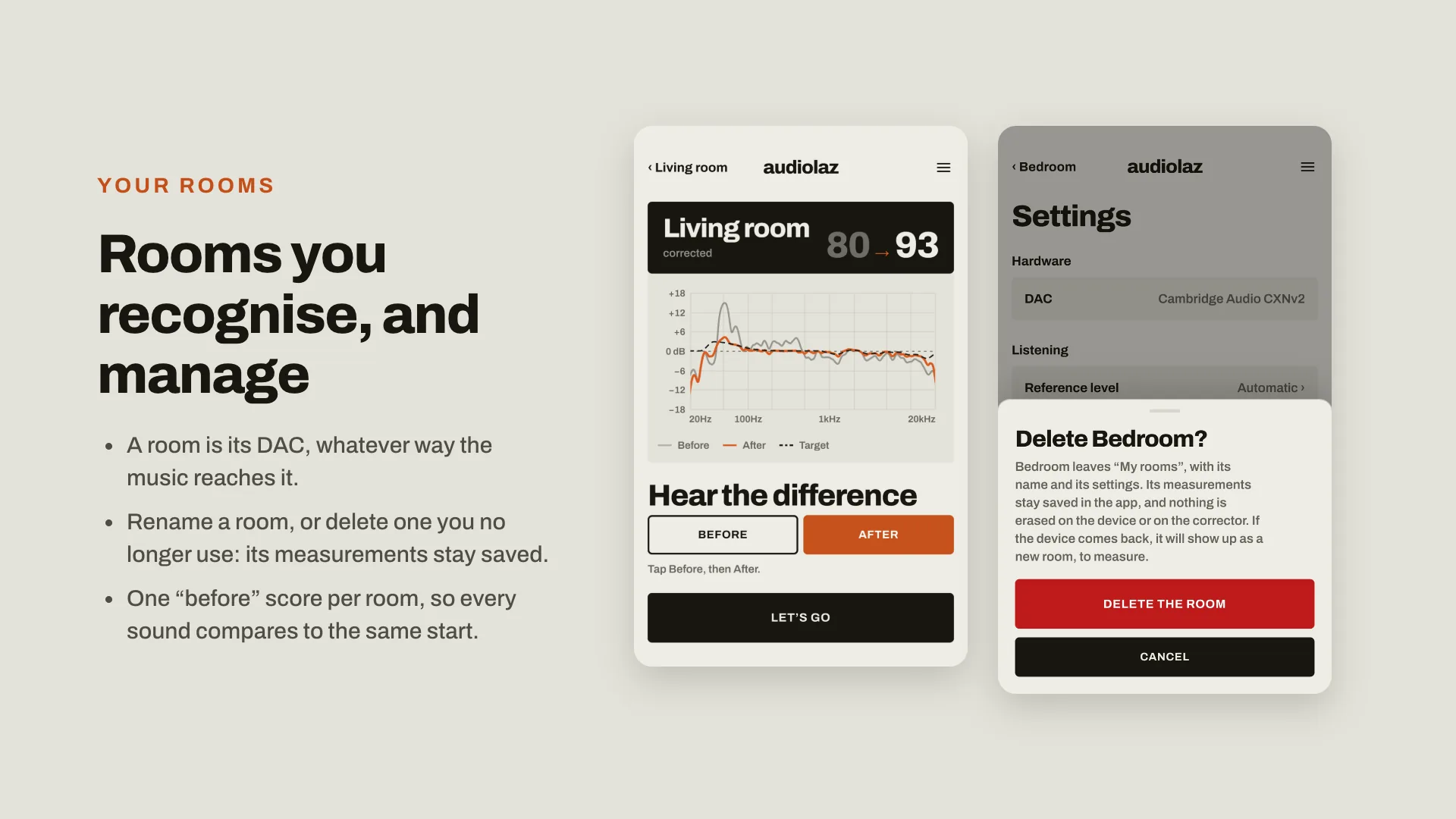
  11. Your rooms, recognised and managed: a room is its DAC, whatever way the music reaches it; rename a room, or delete one you no longer use, its measurements stay saved; one before score per room. Two screens: Hear the difference, and Delete Bedroom?
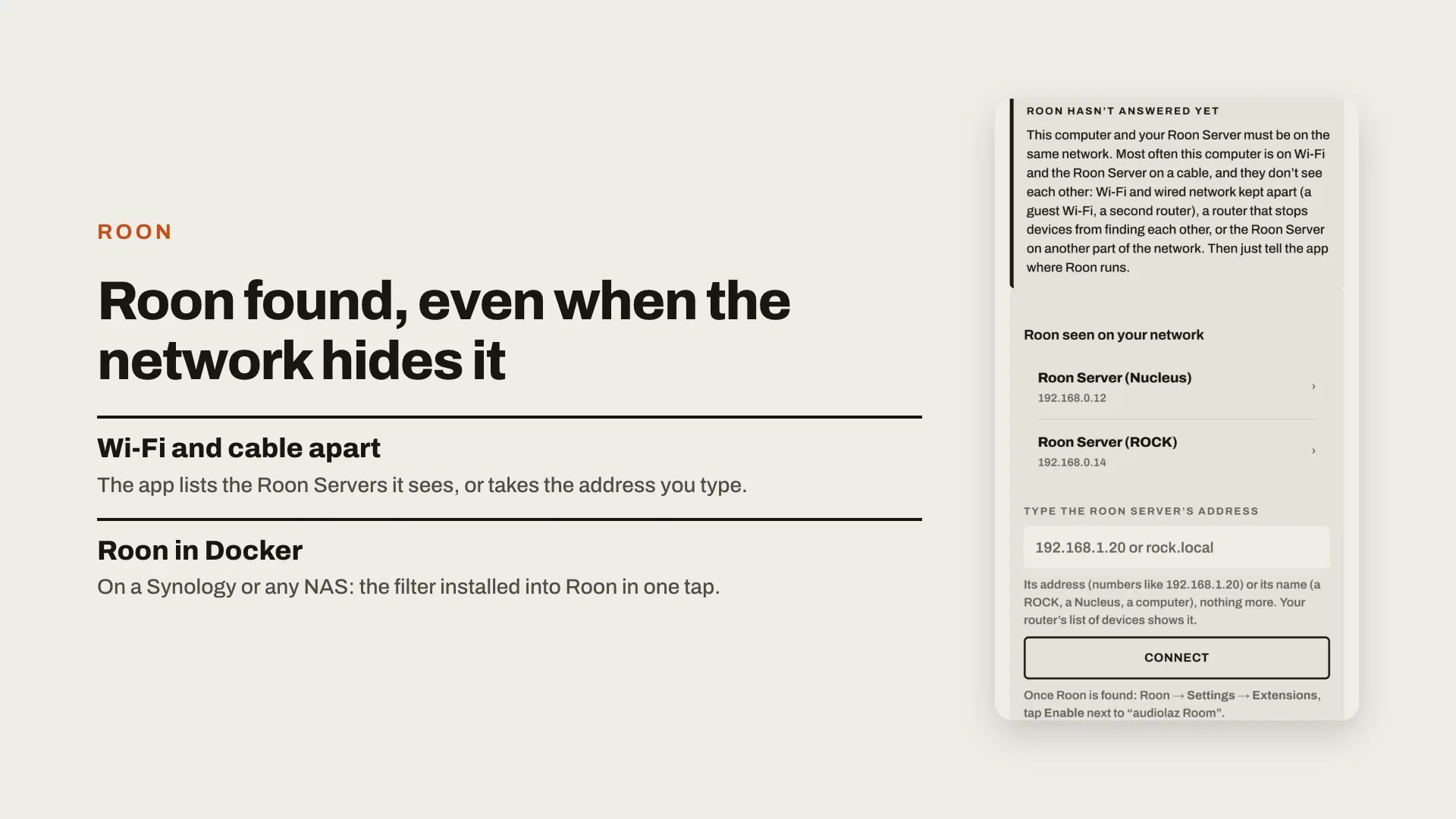
  12. Roon found, even when the network hides it: with Wi-Fi and cable apart, the app lists the Roon Servers it sees, or takes the address you type; Roon in Docker, on a Synology or any NAS, set up in one tap. The screen listing Roon Servers on a Nucleus and a ROCK, and a field for an address.
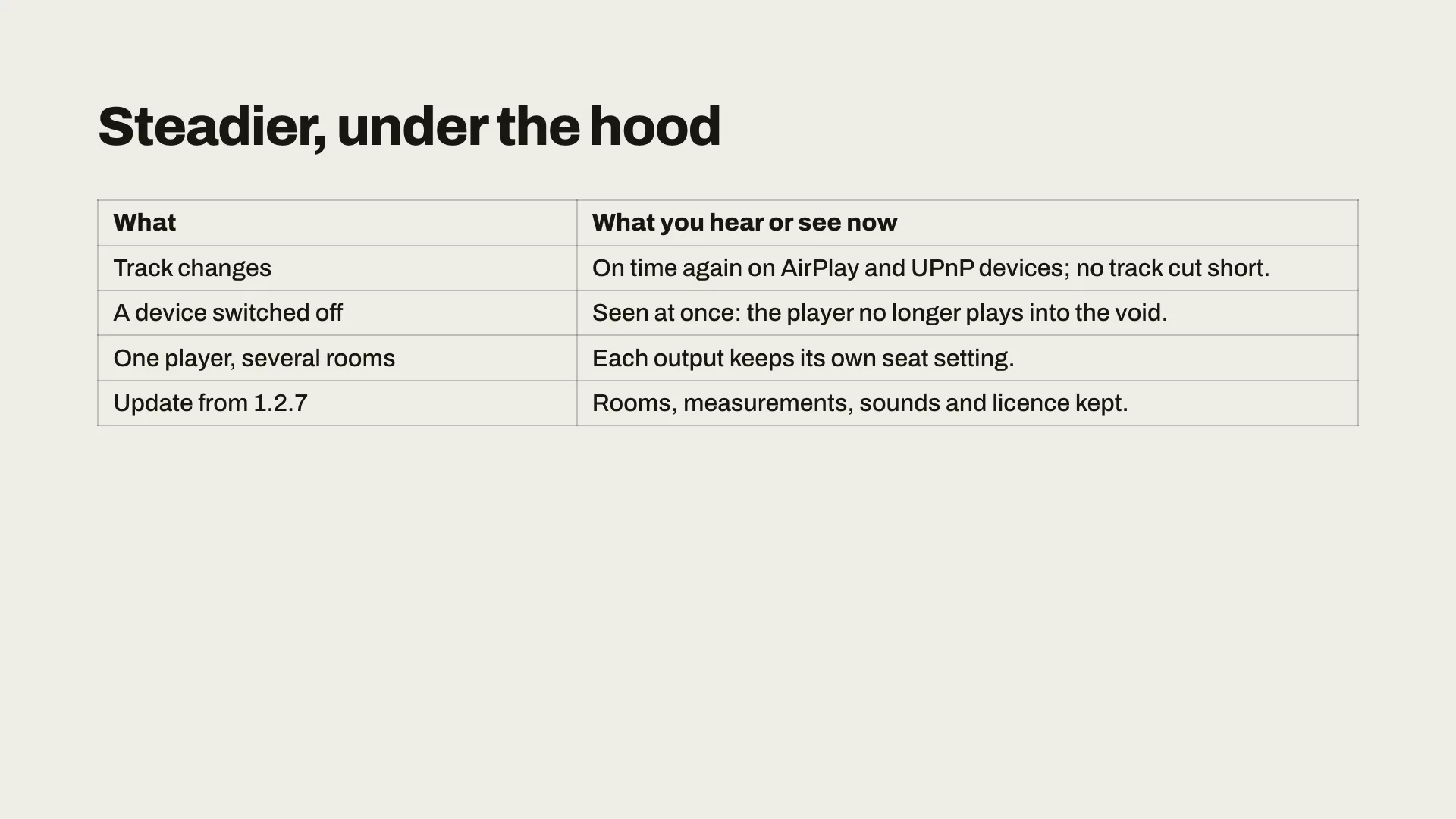
  13. Steadier, under the hood: track changes on time again on AirPlay and UPnP devices, no track cut short; a device switched off is seen at once; with one player and several rooms, each output keeps its own seat setting; the update from 1.2.7 keeps rooms, measurements, sounds and licence.
  14. Updating to 1.3: no need to measure again. Tap Update now in the app; your filters stay as they are, and the app offers to update the player too.

Your rooms

  • A new app built around your rooms: the room that plays comes first; every room says whether it is corrected, with one « before » score and its « after ».
  • Smooth navigation; rename or delete a room; clear words when audiolaz is unreachable.
  • Each output keeps its own place settings: a second system in another room keeps its own.

Recentre on me

  • One tap while the music plays, and the sound is centred on where you sit. Your places are kept, for each room.

audiolaz everywhere

  • audiolaz on Mac: an « audiolaz » sound device, so the sound of every app goes through your room's correction.
  • audiolaz on Linux: an « audiolaz » sound card, installed from the app, so any Linux player plays through the correction.
  • audiolaz Link: the corrected music sent intact to a small receiver beside your DAC, paced by its clock.
  • Add a machine (Settings): install the audiolaz corrector, or an audiolaz Link receiver, on another computer or streamer from the app.
  • Several rooms at once (beta): each output plays its own room, corrected, as its own Roon zone, at the same time.

The free player

  • The audiolaz player is now free: it takes Roon, AirPlay, Spotify Connect and UPnP, sends to any DAC or streamer, and says « Bit-perfect, verified » with the sound's path from source to DAC. audiolaz Room adds the correction of your room.

A surer measurement

  • A clearer sweep, the volume set step by step, each take checked and averaged, both speakers checked before the measurement, and help to align a subwoofer.

Easier setup

  • Roon found across Wi-Fi and cable, or by its address; Roon Server in Docker (a Synology NAS) set up in one step.
  • Every sound at the same level. Track changes on time to AirPlay and UPnP devices; a UPnP device that went to sleep is found again.

iPhone

  • Measurements and exports can be saved to the phone, and a demo shows the whole app without a computer.
  • No need to measure again: your filters stay as they are.

1.2.7 · 11 October 2026

  • AirPlay on the Mac player: steady sound, no more false dropouts.
  • Apple TV lip sync: a « Picture sync » slider, or « Measure the sync »: the « audiolaz Synchro » Apple TV app plays a pattern, the iPhone measures, the player corrects itself (the Apple TV app comes through TestFlight in the next days).
  • UPnP devices: upsampling up to the highest rate the device takes, DSD64 sent as DoP.
  • The Apple TV remote can set your streamer's volume (off by default, never above its maximum).
  • Fixes: Roon covers back on your receiver, the graph labelled up to 20 kHz on a phone, player cards centred.
  • No need to measure again: your filters stay as they are.

1.2.6 · 11 October 2026

  • Same as 1.2.5, now with the faster start on UPnP devices and the lighter player (player 1.2.3) for everyone, including those who installed 1.2.5 last night.
  • No need to measure again: your filters stay as they are.

1.2.5 · 11 October 2026

  • A simpler app: swipe between your filters on the home screen, one clear screen per player (what plays, its cover and rate, its inputs), and the advanced settings under « Expert mode ».
  • No Roon needed: Audirvāna, JRiver and other UPnP apps can now play to the audiolaz player, on a Mac and on Linux. It shows up in them under the player's name.
  • The Mac player now runs the same engine as the Linux one: same sound, same features, and upsampling up to 1536 kHz where your DAC takes it.
  • Apple TV: lip sync set automatically for stereo and 5.1. Optional « audiolaz mix » for 5.1 films (dialogue on the centre channel), Dialogue and Dynamics — all off by default.
  • Faster and lighter: music starts in about 2 s on UPnP devices (it took 10 to 40 s), and the player uses up to half the CPU.
  • Fixes: an AirPlay device waking from standby no longer stops the sound; a DAC held by another app or refusing a rate is handled and explained. Players update themselves (player 1.2.3).
  • No need to measure again: your filters stay as they are.

1.2.4 · 10 October 2026

  • Your players live inside the app: one button per player, named after its device, with a clear screen (what plays, its room, its sound, the filter's curve). Everything else is under « More settings ».
  • Apple TV and iPhone: the player shows up under its output's name (e.g. « CXNv2 · audiolaz »), keeps lips in sync, starts in about 2 s and stops at once on pause. The Mac player receives AirPlay too.
  • Better AirPlay sound: 44.1 kHz end to end, full level, one clean step to 16 bits for AirPlay devices. New for films: Dynamics and Dialogue (off by default).
  • Your streamer's screen shows the title and cover. Each output keeps its own room, and two audiolaz players never fight over one device.
  • After a new measurement, your rooms reach your players by themselves. Players update themselves (player 1.2.1).
  • No need to measure again: your filters stay as they are.

1.2.3 · 9 October 2026

  • Fixed: the Mac app could freeze a few minutes after updating itself (it was waiting for macOS's « access to the Documents folder » prompt). If yours stopped answering, answer « Allow » to that prompt or restart the Mac.
  • Apple TV through Room for Mac: it now says which Mac output the corrected sound comes from, and warns when that output is not connected to your system.
  • No need to measure again: your filters stay as they are.

1.2.2 · 9 October 2026

  • Direct install into Roon on a ROCK or Nucleus works again from the Windows and Mac apps (« Test and save » could not reach the ROCK's share).
  • No need to measure again: your filters stay as they are.

1.2.1 · 9 October 2026

  • After updating the app, also update your audiolaz player: the home screen now offers it in one tap (DSD512 and the other 1.2 player features come with it).
  • An Apple TV stays in sync after the player restarts.
  • No need to measure again: your filters stay as they are.

1.2.0 · 9 October 2026

A big update, so a new number: 1.2.

Easier to use

  • One "Start" button. The app sets everything up for your system by itself.
  • The home screen tells you in one line if the correction is on.
  • "My rooms": rename or delete a room. When you measure again, your previous measurement is kept, so you can go back to it.

The audiolaz player: better sound, more ways to listen

  • Our own player now plays your corrected sound. Installing it is free.
  • With the same filter, it can sound better than Roon's DSP. Try both and compare.
  • It works on a Roon Server running Linux, on a small streamer, and on a Mac.
  • Each room gets its own correction: if your player feeds several systems, it uses the right room for each one.
  • Besides Roon, it also plays AirPlay, Spotify Connect and UPnP.
  • It can play to network devices and AirPlay speakers, and output DSD up to DSD512.

Films and TV

  • Send your Apple TV's sound to the player (or to your Mac) over AirPlay: it is corrected, and picture and sound stay in sync.

Also

  • The Mac download is now approved by Apple: no more "unidentified developer" warning.
  • HQPlayer and Audirvāna are set aside for now, to keep things simple.
  • No need to measure again: your filters stay as they are.

1.1.31 · 7 October 2026

  • The engine’s DSD now goes as DoP by default, as Roon does: on some DACs native DSD made a high whistle. Untick DoP for native DSD.
  • Update the engine from Players: “Update the engine”.
  • The home page: an icon before Measure, Rooms, Speakers, Players and Settings, to find your way at a glance.
  • Bass optimisation is now off until you tick it, in Expert settings.
  • No need to measure again: your filters stay as they are.

1.1.30 · 7 October 2026

  • The audiolaz engine can send your DAC DSD64, 128 or 256, made after the correction as Roon does, with less noise above 20 kHz: Output, on the engine’s page.
  • The engine updates from Players: “Update the engine”.
  • No need to measure again: your filters stay as they are.

1.1.29 · 7 October 2026

  • A home page: your room with its curve and score, your sounds one tap away, then Measure, Rooms, Speakers, Players, Settings and help. The version at its foot.
  • The audiolaz engine installs itself on a Roon Server under Linux (Audiolinux, NUC…), from Players: no terminal, Roon’s settings tick themselves, and it starts again after a pause. In test.
  • A ROCK or a Nucleus is recognised by itself for the direct install: its address filled in, no password asked.
  • Before measuring, compare your two speakers at 1 m, a phone is enough: the app says where they differ.
  • Bass optimisation at your seat, and the result shows the range the filter really corrects (up to 18 kHz with a measurement microphone).
  • No need to measure again: your filters stay as they are.

1.1.28 · 6 October 2026

  • Direct install into a Roon Server on Linux: no terminal any more. The app asks for the Core’s password once, sets up its own access and forgets the password.
  • audiolaz player on a Mac: tracks follow one another again, Qobuz included, and a FLAC track is no longer cut when Roon gets the next one ready.
  • Live tuning: a simpler screen, with short buttons and a one-line explanation.

1.1.27 · 5 October 2026

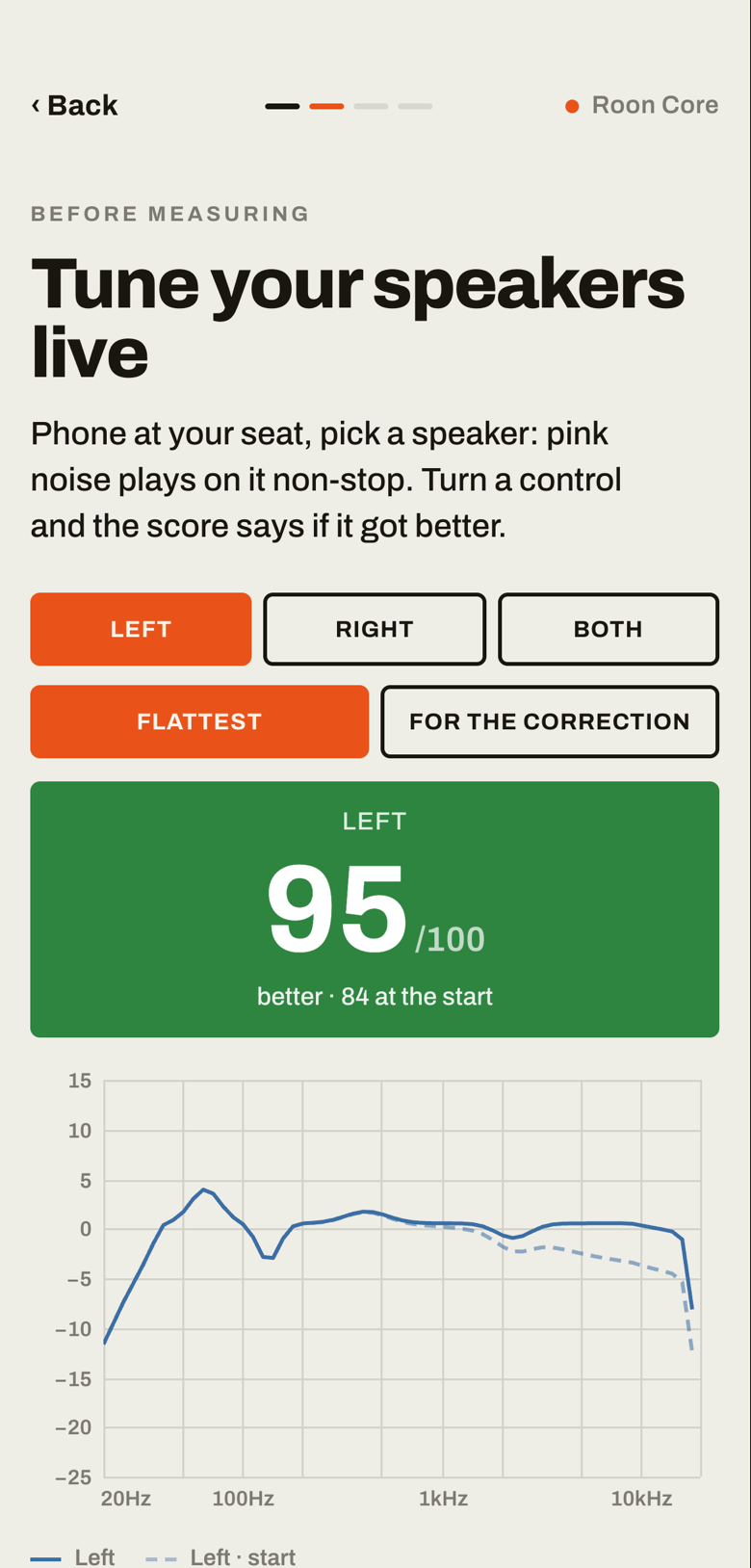
  • New: if your speakers have controls (treble, midrange…), the app helps you set them before the measurement, so the correction starts from their best position.
  • Pink noise plays on one speaker, then the other; at your seat, the phone scores the sound out of 100. Turn a control: the score turns green if it is better, red if it is worse.
Live tuning: the left speaker at 95 out of 100, in green, up from 84 at the start once its treble control was turned up; the starting curve dashed
  • It also checks that both speakers are in phase, evens out their level when your seat is off-centre, and offers to turn the zone’s effects off while you tune.
  • With a measurement mic, the correction now reaches 18 kHz; the wider image and the alignment at your seat are accepted in more rooms.
  • Balanced changes: deeper bass, +3 dB below 80 Hz, keeping Neutral’s treble.
  • A capture spoiled by a noise can be taken again, and the app goes back to your room instead of starting another one.
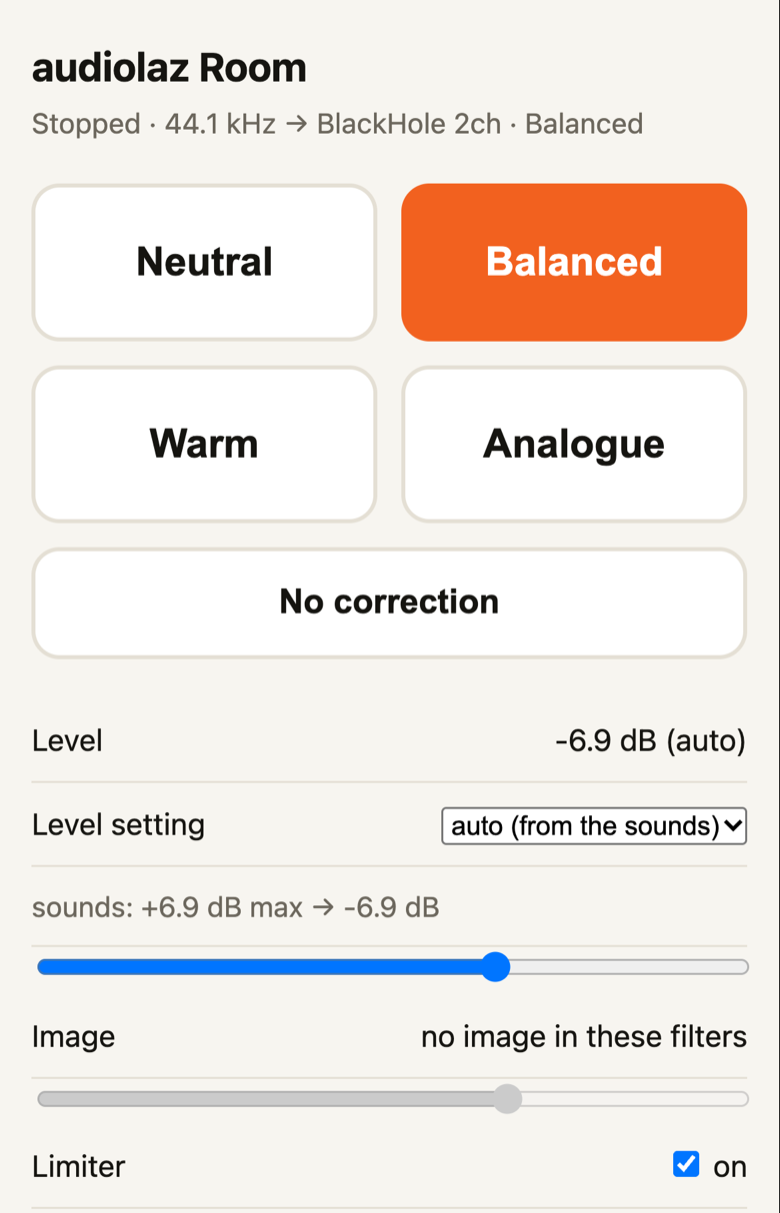
  • Still in test on a Mac, the audiolaz player for Roon: your room’s sounds and “No correction” at one level, switched from its page.
The audiolaz player’s page: Neutral, Balanced, Warm, Analogue and No correction, the level, the image and the limiter

1.1.26 · 4 October 2026

  • In test, on a Mac: the audiolaz player for Roon, a zone of its own (“audiolaz Room”) that plays your room’s four sounds and “No correction” on the Mac’s DAC.
  • All at one level, switched at once from its page on the Mac or your phone; a limiter catches the rare peaks. With the wider image on, its Image setting widens the stage.
  • Start it from the install screen (“Play through audiolaz on this Mac”) and choose your DAC; in Roon, turn Squeezebox support on and enable “audiolaz Room”.
  • It takes the DAC while it plays and lets it go when paused: switch between your usual Roon zone and audiolaz Room to compare.

To enable the zone in Roon, once:

  1. Settings → Setup → Squeezebox Support: Enable.
  2. Settings → Audio: under “Squeezebox”, find “audiolaz Room” and click Enable. Name the zone as you like, keep its volume fixed and its DSP off: the correction is in the player.
  3. Choose the “audiolaz Room” zone and play. The link to the player’s page is in the app, under “Play through audiolaz on this Mac”.

1.1.25 · 4 October 2026

  • Macs with an Intel processor: a version of their own, on your download page beside the Apple silicon one (macOS 13.5 or later).
  • Audirvāna plug-in: its own window (mode, level, limiter, the filter in use, whether the limiter acts), shorter preset names. DSD sent as DoP passes untouched.
  • Installing it in Audirvāna Studio 3: quit Audirvāna first (it keeps the old plug-in until it restarts), then Plugins → Use Audio Units effects.
  • The left/right timing and balance messages are now in English too.

1.1.24 · 3 October 2026

  • Audirvāna on the Mac, in test: the audiolaz plug-in. One button installs it with your filter; inside Audirvāna it corrects at a level of its own, “No correction” at the same level.
  • It plays about 4 dB under Audirvāna without it, a limiter catching the rare peaks: music it does not process is no longer much louder. Start with the volume low.

1.1.23 · 3 October 2026

  • The file for Audirvāna is withdrawn for now: Audirvāna plays some music without the filter (DSD, the filter switched off), and with the amplifier turned up for the filter, it came out much louder.
  • If you loaded one of our files in Audirvāna, remove it and turn the amplifier back down. Audirvāna will come back with an audiolaz plug-in that keeps the same level whatever plays.

1.1.22 · 3 October 2026

  • Audirvāna: “Make the comparison set” prepares in one click the four sounds, over the whole band and over the bass only, and “No correction”, all at the same level.
  • It comes after “Get my filter”, in the “Using Audirvāna?” part. Load the files one after the other without touching the volume: they are in a folder of their own, and in one download.
  • The text inside each Audirvāna file now says by how much the filter lowers the level.

1.1.21 · 3 October 2026

  • Automatic import of presets into MUSE: the four sounds (Neutral, Balanced, Warm, Analogue), plus “No correction” at the same level. Nothing left to load by hand.
  • This works with Roon on the same Mac or PC as the app, with a ROCK or a Nucleus, and with a Linux Core.
  • A network adapter that refuses multicast (a VPN, a virtual machine) no longer makes the app stop.
  • Each update now says what it brings: in the app, before and after it installs, and in Roon, under the extension and in its Settings.

1.1.19 · 2 October 2026

  • Measuring: when a zone starts late (AirPlay, a group), the end of the measurement sound is no longer cut. Roon Radio and repeat are paused for the measurement and put back after. If the sound stops halfway, the phone says so.
  • The cut below your speakers' lowest bass no longer costs any volume.
  • Direct installation into a Linux Roon Core (Audiolinux, a NUC, a NAS) can now be set up from the app's install screen.
  • Security: the app answers only your computer and your home network; no web page from another site can drive it; its folder (rooms, recordings, licence) is readable by your account only.

1.1.17 · 2 October 2026

  • From the app's first screen, “Read” opens your own forum directly: every topic, and you post under your first name.

1.1.16 · 2 October 2026

  • The app's first screen links to these questions and answers, and says when new messages are there.

1.1.15 · 2 October 2026

  • A filter loaded by hand in Roon comes with a “No correction” file at exactly its level: load it as a second MUSE preset and compare without touching the volume.
  • On a computer, the first screen says you can measure right there, with a USB measurement microphone.
  • The icon on the phone's home screen is called “audiolaz Room”.
  • The Roon install steps say where MUSE is: Settings → Audio → ⚙ beside the zone → DSP Engine.

1.1.14 · 1 October 2026

  • A secure address for the phone: a real certificate under lan.audiolaz.com, nothing to install on the phone (the profile stays as a fallback).
  • During a measurement with no sound, the app says why: zone muted, volume at its minimum, nothing playing, another track, a silent microphone.
  • “Something wrong? Send a report”: what the app knows about the installation, with your words, in one tap.

1.1.13 · 1 October 2026

  • The microphone choices are never locked: greyed until the microphone is plugged in, a tap always works.

1.1.12 · 1 October 2026

  • The app updates itself: it checks once a day and installs a new version in one tap, after checking its signature.
  • Your own beta page, with the current version and your licence.
  • Without Roon: measure through HQPlayer, or through this Mac's or PC's output; filters for HQPlayer and Audirvāna, with the attenuation they need inside.
  • With an iPhone, the correction covers the whole range by default too, with a note: its microphone is trusted to about 4 kHz, a range one tap away.
  • Import a target curve of your own.
  • After the verification measurement, the score as measured, with its curve.
  • The licence is per computer.

1.1.10 · 30 September 2026

  • “Test my phone’s microphone”: the phone against a measurement microphone, to see which bass and which range the phone can be trusted with.
  • Every filter is written, read back and checked twice before it is offered.
  • The latest filter of each sound stays in Documents › Room Correction, for the Roon app on that computer.

1.1.9 · 30 September 2026

  • Gentler treble with the full-range correction: above about 1 kHz, never more than 2 dB under the corrected midrange.
  • Image: a wider stereo image, added to the room's filter, with a calibrated microphone and speakers in time at the seat.

1.1.8 · 30 September 2026

  • With a measurement microphone, the correction covers the whole range, up to 20 kHz, by default; with a phone it stays below 500 Hz.
  • Mono streams (talk radio, old recordings) no longer play silent through a filter loaded by hand.
  • Safari on a Mac unzips the downloaded filter, which Roon then refuses: a warning now says so.

1.1.7 · 29 September 2026

  • Microphones recognised by their name or their calibration file (UMIK-1, UMIK-2, Dayton iMM-6C), each with its own level marks.
  • The measuring sounds: either one is enough, and the app puts them in your Roon library when Roon runs on the same computer.
  • On the computer, the phone's address as a QR code, with the firewall steps for Windows and Mac.

1.1 to 1.1.6 · 29 September 2026

  • Pairing with the Roon Core no longer crashes.
  • Every sound, and “No correction”, plays at the same loudness.
  • The phone tile on Android; Dayton microphones recognised; the Mac app shows its beta number.
  • The start page no longer stays stuck on “Checking the secure connection”.
  • The measuring-sound step says why it waits, with a “Check again” button.

1.0 · 28 September 2026

The first beta, to the first testers: measure with the phone or a measurement microphone, pick a sound, and hand the filter to Roon's convolution, by hand or, on a Linux Core, through the app itself.

What you post here is public, with the name you give; we keep nothing else about you (see Privacy).